HP Scanjet 8300 Professional$288.00 to $728.00
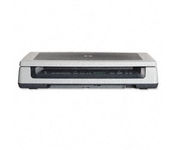
Scan documents, photos, film and other materials with a versatile scanner. Perform common tasks—scan, create PDFs and even make copies by sending a scan to the default printer—with one-touch buttons. Adjust resolution to fit scanning needs.
Manufacturer:Hewlett Packard Product MPN MPN | L1963A | Key Features Scanner Type | Flatbed Scanner | Interface | USB 2.0 | Optical Resolution | 4800 dpi | Max. Resolution (Hardware) | 4800 x 4800 dpi | Max. Resolution (Interpolated) | Up to 999,999 dpi | Platform | PC, Mac | Max. Color Depth | 48-bit Color | Technical Features Form Factor | Desktop | Input Type | Color | Special Features | OCR Capability | Control Panel Buttons | Scan • Copy • Cancel | Max. Gray Depth | 8-Bit (256 Gray Levels) | Media Supported Media Type | Plain Paper • Bulk Objects (Books, etc.) • Photos • 3D Objects • Negatives • Text | Media Loading Method | Manual Load • Optional Automatic Document Feeder | Max. Supported Media Size | 215.9 x 355.6 mm | System Requirements Platform | PC • Mac | Operating System | Apple MacOS • Microsoft Windows 2000 • Microsoft Windows 98 Second Edition • Microsoft Windows Millennium Edition • Microsoft Windows XP Home • Microsoft Windows XP Professional | Dimensions Width | 24.61 in. | Depth | 16.34 in. | Height | 5.12 in. | Weight | 19.6 lb. | Miscellaneous Included Accessories | USB Cable |
Tags:hp, scanjet, 8300, professional,
| Canon CanoScan 5600F$110.00 to $216.00
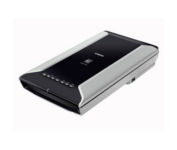
This is high-performance scanning at its best. The high-luminance white LED lamps use less power and enable scanning immediately after you press the power button. Seven EZ Buttons automate the scanning process—so it's simple to scan, copy and create emails and multi-page PDFs. To make it even easier, the Auto Scan Mode detects your type of original, then scans and saves it with the optimal settings. How fast? A letter-sized color scan takes only about 11 seconds2.Minimize
Manufacturer:Canon Product MPN MPN | 2925B002 | Key Features Scanner Type | Flatbed Scanner | Interface | USB 2.0 | Optical Resolution | 4800 dpi | Max. Resolution (Hardware) | 4800 x 9600 dpi | Max. Resolution (Interpolated) | 19200 x 19200 | Platform | PC, Mac | Max. Color Depth | 48-bit Color | Technical Features Form Factor | Desktop | Scan Element Type | CCD | Light Source | White and Infrared LED array | Input Type | Color | Max. Gray Depth | 16-Bit (64K Gray Levels) | Media Max. Supported Media Size | 8.5" x 11.7" | System Requirements Platform | PC • Mac | Operating System | Microsoft Windows 2000 • Microsoft Windows XP • Microsoft Windows Vista • Apple MacOS X 10.3 • Apple MacOS X 10.3.6 • Apple MacOS X 10.4 • Apple MacOS X 10.2.8 • Apple MacOS X 10.5 • Apple MacOS X 10.4.11 | Dimensions Width | 10.7 in. | Depth | 19.4 in. | Height | 3.8 in. | Weight | 9.5 lb. | Warranty Warranty | 1 Year | Miscellaneous Included Accessories | Power Cord • USB Cable | Family Line | Canon CanoScan |
Tags:canon, canoscan, 5600f,
|
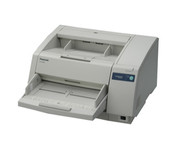
The KV-S3065CL high-speed scanner is the reliable choice for low volume color document management solutions. With its capability to detect color and black & white pages this attribute reduces scan-to-file size while promoting a more efficient scanning process. The switch able reference accommodates software and driver specific requirements by supporting both black and white references, this then also ensures the highest quality of accuracy when cropping and/ or de-skewing. Hybrid Contact Image Sensor Technology incorporates a 3-line CCD image sensor and dual fluorescent white lamps, resulting in the best technologies.Minimize
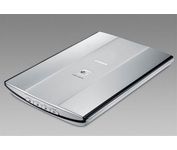
How easy is this? Just select what you want to do with your original-scan, copy, or create email attachments or PDFs-and the entire process is automated. The new Auto Scan Mode detects your type of original, then scans and saves it with the optimal settings. Your results will be outstanding, with color dpi resolution up to 4800 x 4800, and you can also create fabulous 19200 x 19200 software-enhanced interpolated scans. Plus, a letter-sized color scan takes only about 14 seconds2. The Advanced Z-Lid lets you produce clear, complete scans of thick originals such as notebooks. And to reduce "cable clutter," one simple cable provides power and a USB 2.0 Hi-Speed connection.Minimize
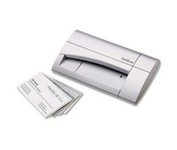
The CardScan Personal Business Card Scanner is a compact device is easy to take along on business trips. This handy, USB-powered card monochrome (black-and-white) scanner quickly gathers important contact information and then lets you store it, synchronizing with Microsoft Outlook, Palm handhelds, Pocket PCs and various smartphones.Minimize
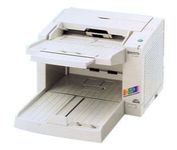
The KV-S2026C WorkGroup color scanner and the KV-S2046C Departmental color scanner provide you superior durability with advanced image processing, all at a compact size and price. Both of these scanners are revolutionary in design, with superb paper handling and a small footprint, making them an ideal desktop solution for file management and critical image processing applications.Minimize
