Epson Perfection V500$158.00 to $293.00
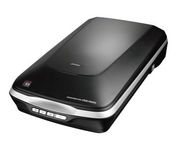
The Epson Perfection V500 Photo offers extraordinary quality and versatility with 6400 dpi resolution and an earth-friendly LED light source for greater productivity — all at an amazing value. Remove dust and scratches from slides, negatives and film. Or, restore faded color photos with one touch. Then, take your photos further with the included Adobe Photoshop Elements.Minimize
Manufacturer:Epson Product MPN MPN | V-500 | Key Features Scanner Type | Flatbed Scanner | Interface | USB 2.0 | Optical Resolution | 6400 dpi | Max. Resolution (Hardware) | 6400 x 9600 dpi | Max. Resolution (Interpolated) | 12800 x 12800 dpi | Platform | PC, Mac | Max. Color Depth | 48-bit Color | Technical Features Form Factor | Desktop | Scan Element Type | CCD | Input Type | Color | Film Scanning Capabilities | 35mm Slides • 35mm Filmstrip • Positive Film • Negative Film | Optical Density | 3.4 Dmax | Exposure Control | Auto | Control Panel Buttons | Scan • Copy • E-mail • PDF | Automatic Document Feeder Capacity | 30 Pages | Max. Gray Depth | 16-Bit (64K Gray Levels) | Media Media Loading Method | Manual Load | Max. Supported Media Size | 216 x 297 mm | System Requirements Platform | PC • Mac | Operating System | Microsoft Windows XP Home • Microsoft Windows XP Professional • Microsoft Windows 2000 Pro • Microsoft Windows XP Pro x64 • Microsoft Windows Vista | Dimensions Width | 18.8 in. | Depth | 10.7 in. | Height | 4.5 in. | Weight | 8.9 lb. | Warranty Warranty | 1 Year | Miscellaneous UPC | 8715946353821 | Family Line | Epson Perfection |
Tags:epson, perfection, v500,
| Panasonic KVS2046C$2,068.00 to $5,351.00
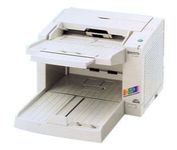
The KV-S2026C WorkGroup color scanner and the KV-S2046C Departmental color scanner provide you superior durability with advanced image processing, all at a compact size and price. Both of these scanners are revolutionary in design, with superb paper handling and a small footprint, making them an ideal desktop solution for file management and critical image processing applications.Minimize
Manufacturer:Panasonic Product MPN MPN | KV-S2046C | Key Features Scanner Type | Pass-Through Scanner | Interface | USB 2.0 • SCSI-3 Ultra Wide (16-bit) | Optical Resolution | 600 dpi | Max. Resolution (Hardware) | 600 x 600 dpi | Platform | PC | Max. Color Depth | 24-bit (16.7M Colors) | Technical Features Form Factor | Desktop | Scan Element Type | Contact Image Sensor (CIS) | Light Source | RGB LED | Input Type | Color | Automatic Document Feeder Capacity | 120 Pages | Max. Gray Depth | 8-Bit (256 Gray Levels) | Media Supported Media Type | Plain Paper | Media Loading Method | Autoload • Automatic Document Feeder | Max. Supported Media Size | 216 x 635 mm | System Requirements Platform | PC | Operating System | Microsoft Windows 2000 • Microsoft Windows 95 • Microsoft Windows 98 • Microsoft Windows Millennium Edition • Microsoft Windows NT • Microsoft Windows XP | Dimensions Width | 13.5 in. | Depth | 19.2 in. | Height | 9.4 in. | Weight | 20.1 lb. | Miscellaneous UPC | 092281824185 | Family Line | Panasonic KV |
Tags:panasonic, kvs2046c,
| HP Scanjet N8420$952.00 to $1,672.00
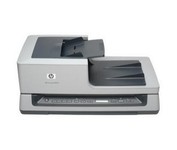
Get ready to duplex scan loads of material with our Scanjet N8420 Document Sheet-feed Scanner. You'll get output of up to 25 pages per minute or 50 images per minute.
Manufacturer:Hewlett Packard Product MPN MPN | L2689A#B1H | Key Features Scanner Type | Flatbed Scanner | Interface | USB 2.0 | Optical Resolution | 600 dpi | Max. Resolution (Hardware) | 600 x 600 dpi | Max. Resolution (Interpolated) | 600 x 600 dpi | Platform | PC | Max. Color Depth | 24-bit (16.7M Colors) | Technical Features Form Factor | Desktop | Input Type | Color | Control Panel Buttons | Scan • Copy • Cancel | Automatic Document Feeder Capacity | 100 Pages | Max. Gray Depth | 8-Bit (256 Gray Levels) | Media Supported Media Type | Cards • Envelopes • Greeting Cards • Index Cards • Photo Paper • Plain Paper • Inkjet Paper • 3D Objects | Media Loading Method | Automatic Document Feeder | Max. Supported Media Size | Legal (216 x 356 mm) | System Requirements Platform | PC | Operating System | Microsoft Windows 2000 • Microsoft Windows XP Home • Microsoft Windows XP Professional • Microsoft Windows XP Pro x64 | Dimensions Width | 24.61 in. | Depth | 16.34 in. | Height | 10.43 in. | Weight | 33.07 lb. | Miscellaneous Included Accessories | Power Cord • USB Cable • Automatic Document Feeder • User Guide | UPC | 883585086214 | Family Line | HP ScanJet |
Tags:hp, scanjet, n8420,
|
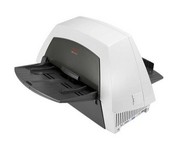
The KODAK i1420 Scanner brings speed and agility to your business with the ability to handle documents in virtually any condition or size at up to 60 pages per minute. For ease of use, duplex scanning captures both sides of documents in one pass, and enhanced Perfect Page image processing make your images crisp and clean.Minimize
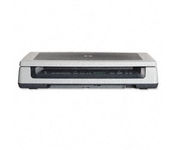
Scan documents, photos, film and other materials with a versatile scanner. Perform common tasks—scan, create PDFs and even make copies by sending a scan to the default printer—with one-touch buttons. Adjust resolution to fit scanning needs.
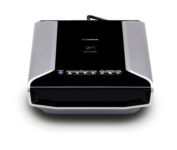
Sleek and fast, this powerful scanner will impress you the very first time you push power. With high-luminance white LED lamps — it's ready to scan immediately, with no warm-up time needed. You'll quickly produce spectacular results, with max. Color dpi resolution of 4800 x 9600. Seven easy buttons automate the scanning process, so it's simple to scan copy and create e-mails and multi-page PDF. Built-in FARE 3.0 retouching technology helps to enhance your final images. And to save time, you can batch-scan up to twelve 35mm frames or up to four slides — either positives or negatives.Minimize
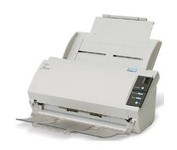
The fi-5110C image scanner with USB 2.0 interface capability expands the market for production scanning. These features will insure Fujitsu's customers' productivity well into the future.