CardScan Personal V8$135.00 to $260.00
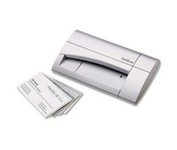
The CardScan Personal Business Card Scanner is a compact device is easy to take along on business trips. This handy, USB-powered card monochrome (black-and-white) scanner quickly gathers important contact information and then lets you store it, synchronizing with Microsoft Outlook, Palm handhelds, Pocket PCs and various smartphones.Minimize
Manufacturer:CardScan Product MPN MPN | CSPA08480ENG | Key Features Platform | PC | Technical Features Form Factor | Portable | Input Type | Monochrome | System Requirements Platform | PC | Operating System | Microsoft Windows 2000 • Microsoft Windows 98 • Microsoft Windows Millennium Edition • Microsoft Windows XP | Dimensions Width | 4.75 in. | Depth | 3.25 in. | Height | 1.5 in. | Weight | 0.475 lb. | Warranty Warranty | 2 Years | Miscellaneous Release Date | September, 2006 | UPC | 792980084803 |
Tags:cardscan, personal, v8,
| HP Scanjet G3110$50.00 to $137.00
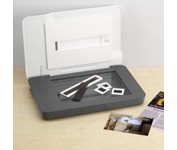
The versatile HP Scanjet G3110 Photo Scanner makes it easy to preserve, share and archive precious photos and important documents. With one-touch buttons and a quick-and-easy, task-based interface, the HP Scanjet G3110 Photo Scanner is ideal for customers who want to create high quality scans of photos, slides, negatives, documents and 3-D objects. The scanner boasts 4800 x 9600 dots per inch (dpi) and 48-bit color resolution scanning for optimum image quality. HP’s scanning technology allows users to enhance images by restoring faded colors, correcting flaws caused by dust particles and scratches, and removing red-eye from scanned images. The HP Scanjet G3110 also makes it easy to archive, edit, share and print scans thanks to HP Document Manager and HP Photosmart Essential software.Minimize
Manufacturer:Hewlett Packard Product MPN MPN | L2698A#B1H | Key Features Scanner Type | Flatbed Scanner | Interface | USB 2.0 | Optical Resolution | 4800 dpi | Max. Resolution (Hardware) | 4800 x 9600 dpi | Max. Resolution (Interpolated) | Up to 999,999 dpi | Platform | PC, Mac | Max. Color Depth | 48-bit Color | Technical Features Form Factor | Desktop | Scan Element Type | CCD | Light Source | Cold Cathode Fluorescent Lamp | Input Type | Color | Special Features | OCR Capability | Film Scanning Capabilities | 35mm Slides • Negative Film | Control Panel Buttons | Scan • Copy • E-mail • PDF | Max. Gray Depth | 8-Bit (256 Gray Levels) | Preview Speed | 11 Sec | Networking Data Link Protocol | Hi-Speed USB | Media Supported Media Type | Plain Paper • Inkjet Paper • 3D Objects • 35 mm Slides • Negatives • Slides | Media Loading Method | Manual Load | Max. Supported Media Size | 8.5" x 11.7" | System Requirements Platform | PC • Mac | Operating System | Microsoft Windows 2000 • Microsoft Windows XP Home • Microsoft Windows XP Professional • Microsoft Windows XP Media Center • Microsoft Windows XP Pro x64 • Microsoft Windows Vista • Apple MacOS X 10.5 • Apple MacOS X 10.4.11 | Dimensions Width | 17.91 in. | Depth | 12.01 in. | Height | 2.76 in. | Weight | 6.39 lb. | Warranty Warranty | 90 Days | Miscellaneous Included Accessories | Power Cord • USB Cable | UPC | 0883585789085 |
Tags:hp, scanjet, g3110,
| HP Scanjet 8300 Professional$288.00 to $728.00
Scan documents, photos, film and other materials with a versatile scanner. Perform common tasks—scan, create PDFs and even make copies by sending a scan to the default printer—with one-touch buttons. Adjust resolution to fit scanning needs.
Manufacturer:Hewlett Packard Product MPN MPN | L1963A | Key Features Scanner Type | Flatbed Scanner | Interface | USB 2.0 | Optical Resolution | 4800 dpi | Max. Resolution (Hardware) | 4800 x 4800 dpi | Max. Resolution (Interpolated) | Up to 999,999 dpi | Platform | PC, Mac | Max. Color Depth | 48-bit Color | Technical Features Form Factor | Desktop | Input Type | Color | Special Features | OCR Capability | Control Panel Buttons | Scan • Copy • Cancel | Max. Gray Depth | 8-Bit (256 Gray Levels) | Media Supported Media Type | Plain Paper • Bulk Objects (Books, etc.) • Photos • 3D Objects • Negatives • Text | Media Loading Method | Manual Load • Optional Automatic Document Feeder | Max. Supported Media Size | 215.9 x 355.6 mm | System Requirements Platform | PC • Mac | Operating System | Apple MacOS • Microsoft Windows 2000 • Microsoft Windows 98 Second Edition • Microsoft Windows Millennium Edition • Microsoft Windows XP Home • Microsoft Windows XP Professional | Dimensions Width | 24.61 in. | Depth | 16.34 in. | Height | 5.12 in. | Weight | 19.6 lb. | Miscellaneous Included Accessories | USB Cable |
Tags:hp, scanjet, 8300, professional,
|
This is high-performance scanning at its best. The high-luminance white LED lamps use less power and enable scanning immediately after you press the power button. Seven EZ Buttons automate the scanning process—so it's simple to scan, copy and create emails and multi-page PDFs. To make it even easier, the Auto Scan Mode detects your type of original, then scans and saves it with the optimal settings. How fast? A letter-sized color scan takes only about 11 seconds2.Minimize
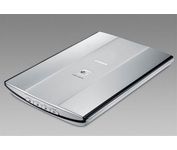
How easy is this? Just select what you want to do with your original-scan, copy, or create email attachments or PDFs-and the entire process is automated. The new Auto Scan Mode detects your type of original, then scans and saves it with the optimal settings. Your results will be outstanding, with color dpi resolution up to 4800 x 4800, and you can also create fabulous 19200 x 19200 software-enhanced interpolated scans. Plus, a letter-sized color scan takes only about 14 seconds2. The Advanced Z-Lid lets you produce clear, complete scans of thick originals such as notebooks. And to reduce "cable clutter," one simple cable provides power and a USB 2.0 Hi-Speed connection.Minimize
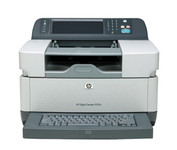
The 9250c Digital sender makes it easy to create electronic copies of your paper documents so you can distribute them easily, store them efficiently, and organize them right along with your other electronic files.
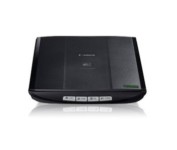
This is simple, high-performance scanning at its best. Four easy buttons automate the entire process, and the new Auto Scan mode makes it even easier: It actually detects the type of original you're scanning—a photo, business card, notebook or form—automatically adjusts settings for the optimal results, then scans and saves the image.Minimize